Signal Attributes
Rate Transition
discrete.rate_transition · Signal Attributes
Passes a signal between two rates (two ECU tasks) in a way that is deterministic on an RTOS.
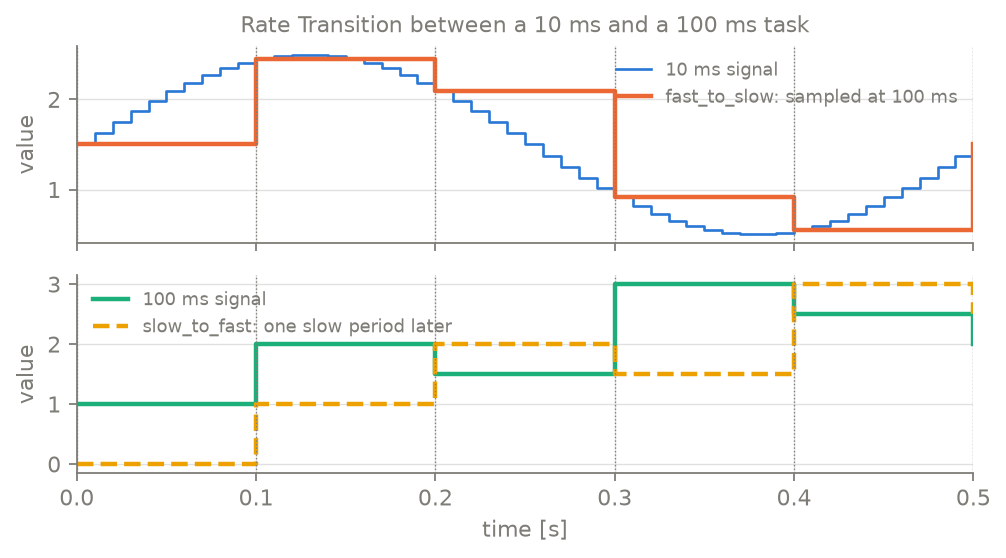
Set sample_time to the slower of the two rates. For slow_to_fast, also set output_sample_time to
the fast rate, so that the blocks after it inherit the fast rate.
fast_to_slow: the slow task gets the fast signal sampled at its own start: \(y = u\) at every slow sample (like a Zero-Order Hold).slow_to_fast: the fast task gets the slow signal one slow period late: \(y[k] = u[k-1]\) at the slow rate (like a Unit Delay), held in between.
Why the delay? On an ECU the fast task interrupts the slow one. If the fast task read the slow task's output
directly, it would sometimes see the old and sometimes the new value, depending on timing. With the delay it
always sees the value the slow task finished one period ago, in the simulation and on the target.
C code generated with one function per task (generate_c(..., tasks=True)) requires a Rate Transition on
every signal that crosses between rates.
Parameters
| Name | Default | Unit | Description |
|---|---|---|---|
direction |
'fast_to_slow' |
From a faster to a slower rate, or from slower to faster — one of fast_to_slow, slow_to_fast |
|
initial |
0.0 |
Output before the first slow sample has arrived (slow_to_fast) | |
sample_time |
0.1 |
s | Sample period (-1 = inherit from input) |
output_sample_time |
-1 (inherited) | s | slow_to_fast: the fast rate that the blocks after it inherit (-1 = the sample time) |
Direct feedthrough: depends on parameters
Data Type Conversion
routing.datatype_conversion · Signal Attributes
Converts the input to another data type, e.g. a sensor value to int16 or a controller output to
fixed point.
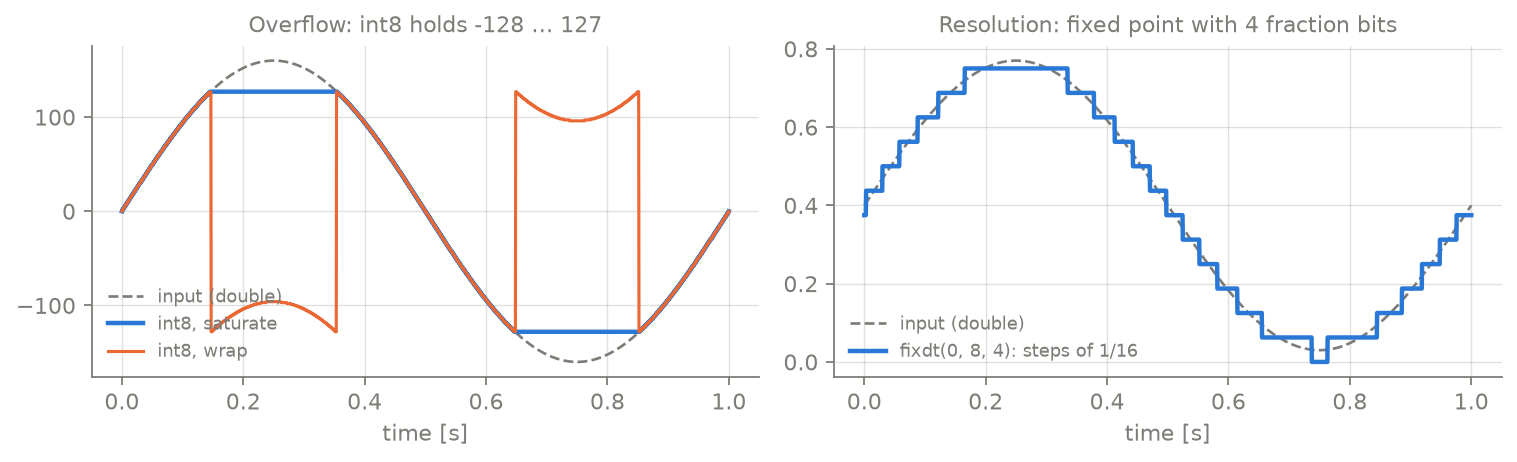
The real-world value is kept as well as the type allows:
rounding: nearest (half away from zero), floor, ceil or zero (truncate). overflow:
saturate limits to the type's range; wrap wraps around like C integer arithmetic. For example
int8 turns 3.6 into 4, and 200 into 127 (saturate) or -56 (wrap).
Parameters
| Name | Default | Unit | Description |
|---|---|---|---|
output_type |
'int16' |
Output data type: inherit, double, single, boolean, int8…uint32, fixdt(signed, bits, fraction) | |
rounding |
'nearest' |
Rounding — one of nearest, floor, ceil, zero |
|
overflow |
'saturate' |
Out-of-range values — one of saturate, wrap |
Direct feedthrough: yes
Initial Condition
routing.initial_condition · Signal Attributes
Outputs value at the start of the simulation, then passes its input through:
Use it to give a signal a defined value in the first step, for example a feedback signal that would otherwise start at the wrong value, or a sensor value before the first measurement. In generated C the block keeps a flag that is cleared after the first step.
Parameters
| Name | Default | Unit | Description |
|---|---|---|---|
value |
0.0 |
Output at the start time |
Direct feedthrough: yes