Tutorial: A truck on a mountain road
| You will learn | heavy-duty vehicles: a diesel's narrow torque band, a 12-speed automated gearbox (State Chart), cruise control, an exhaust brake on a descent |
| Before this | A car on a drive cycle, Gear-shift logic |
| Level and time | intermediate, about 30 minutes |
| Follow along | start the editor (uv run nervus), File ▸ Open examples/truck.nervus, press ▶ and double-click the scopes; the figures below come from the same model |
| Topic | Powertrain and engine control ▸ Transmission and driveline (all tutorials) |
examples/truck.py puts a 40-tonne truck on a 6 % climb and a 6 % descent: a heavy-duty diesel engine, a
12-speed automated manual gearbox (AMT) with its shift logic as a State Chart, cruise control and an exhaust
brake.
uv run python examples/truck.py
The climb
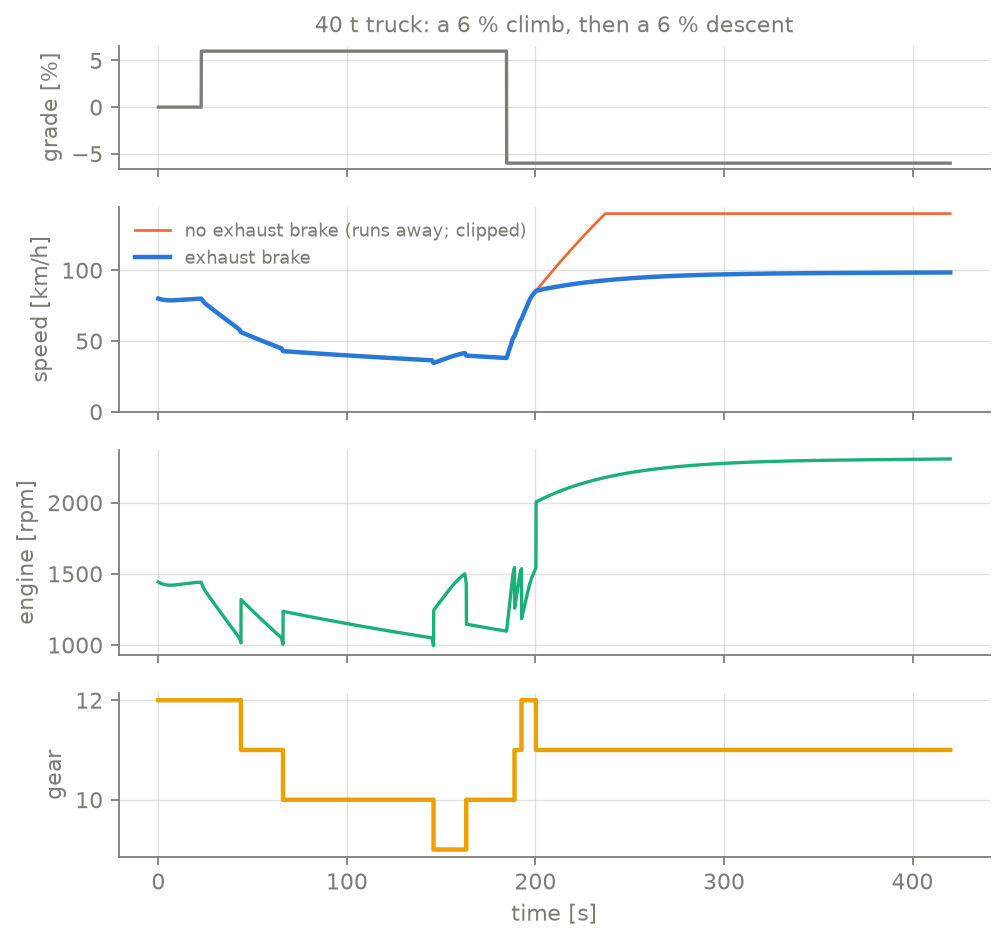
The engine (2600 N·m from 1000 to 1400 rpm) is small for 40 tonnes: on a 6 % climb the gravity alone is \(40\,000 \cdot 9.81 \cdot 0.06 \approx 23.5\) kN. The truck slows from 80 to under 40 km/h, and the AMT shifts down one gear at a time whenever the engine falls below 1050 rpm, so it stays in its narrow band of full torque. Each shift interrupts the torque for 0.8 s (the clutch opens and the gearbox synchronises), which on a steep climb costs speed: that is why truck gearboxes have many closely spaced gears.
The descent
Downhill the same 23.5 kN push the truck. The service brakes would overheat on a long descent, so the truck
uses an auxiliary brake: the exhaust flap closes and the engine works as a compressor, braking more the
faster it turns. The ECU closes it above the set speed + 4 km/h, and the TCU holds a lower gear so the engine
turns fast. Here the exhaust brake holds the truck at 98 km/h; without it the truck would run away. To hold
84 km/h on this descent it needs more braking power, which is why trucks for mountain roads also have a
hydraulic retarder. The chart's param values (shift speeds, hold speed, shift time) are calibration data in
the workspace.
Experiments
To try one: change the value in the Model Workspace tab (double-click it), or for a block parameter select the block and edit it in Properties; press ▶ and compare with the previous run in the Data Inspector (Ctrl+I). Ctrl+Z undoes the change.
| Try | What you will see |
|---|---|
exhaust_brake = 0 |
the truck runs away on the descent |
shift_time = 2.0 |
longer interruptions: the truck loses more speed with every downshift on the climb |
down_rpm = 900 |
later downshifts: the engine labours below its torque band |
Next
That was the last tutorial on powertrain and engine control. Continue with vehicle dynamics and energy: A car on a drive cycle, or pick another one from the tutorial overview.