Tutorial: A vehicle network (CAN)
| You will learn | ECUs on simulated CAN buses: DBC files, arbitration and bus load, a gateway, rest-bus simulation, E2E protection, fault injection and timeouts, the bus trace |
| Before this | Your first model: a cruise control; read CAN communication first |
| Level and time | advanced, about 40 minutes |
| Follow along | start the editor (uv run nervus), File ▸ Open examples/can_network.nervus, press ▶ and double-click the scopes; the figures below come from the same model |
| Topic | ECU software, communication and diagnostics ▸ Vehicle networks (all tutorials) |
examples/can_network.py connects ECUs over two simulated CAN buses: an engine ECU (ECM) on the
powertrain CAN (500 kbit/s), an instrument cluster on the body CAN (125 kbit/s), a gateway
between them, and a rest-bus simulation for the ECUs that are not modelled. Then it breaks things.
uv run python examples/can_network.py
The network
- ECM (a subsystem, 10 ms): CAN Pack (
EngineSpeed,CoolantTempofEngineData, DBC fileexamples/data/vehicle.dbc) → E2E Protect (CRC in byte 6, alive counter in byte 7) → CAN Transmit onpowertrain. - Rest bus: the
GATEWAYnode'sVehicleDataevery 20 ms, from the DBC's cycle times. - Gateway: routes 0x100 and 0x200 to
bodyevery 1 ms. - Cluster (10 ms): CAN Receive (bytes) → E2E Check → CAN Unpack. A frame that fails the check is
ignored and the needle holds its last good value. A counter measures the time since the last valid frame;
after
comm_timeout= 100 ms the needle drops to 0 and the U0100 monitor (lost communication with the ECM) sets its code.
The run prints the bus loads (powertrain 3.7 %, body 14.6 %: the same frames take four times as long at 125 kbit/s) and the gateway latency (about 1 ms: up to one gateway period plus the frame time). Tools ▸ CAN Bus Trace shows every frame after a run in the app.
Faults
From 1 s, 20 % of the ECM's frames get a flipped data bit (corrupt_rate). The CAN CRC would catch a bit
error on the wire, so this models a fault behind it, in a gateway's memory or the sender's software. Only the
E2E CRC can see it:
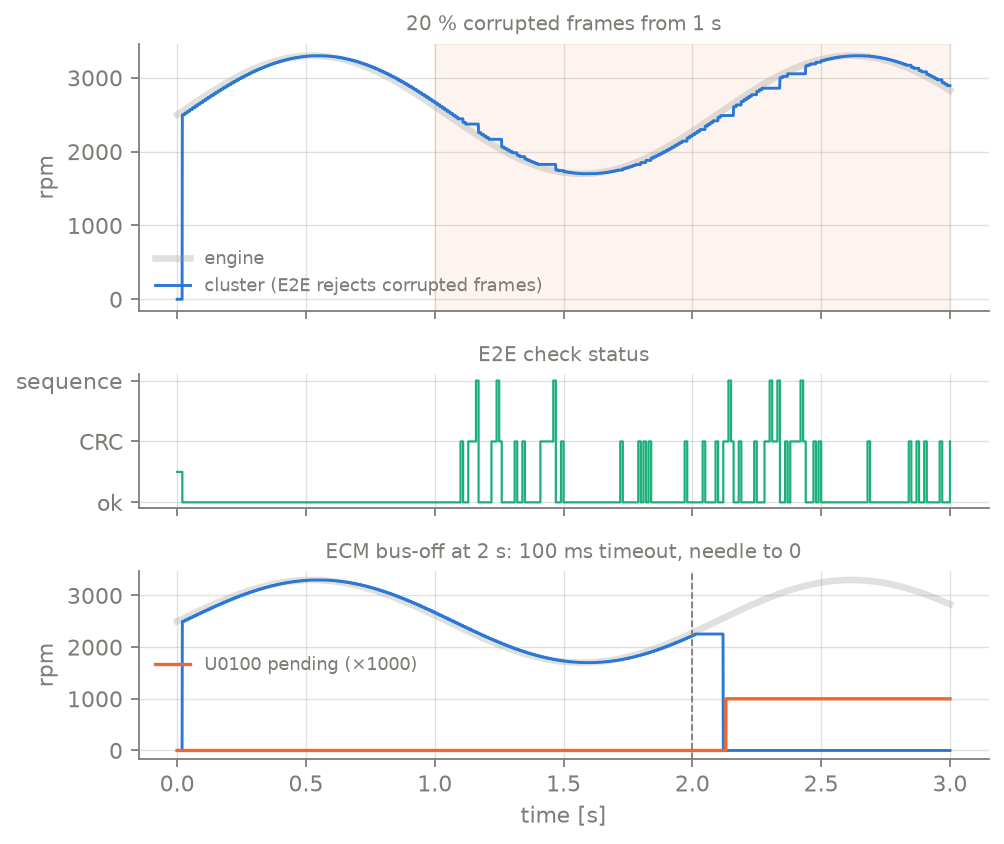
The check reports wrong CRC for each corrupted frame; after two corrupted frames in a row the counter has
jumped by 3 and it reports wrong sequence (max_delta = 2). The needle never shows a corrupted value,
it just holds for 10 to 20 ms. The third test case switches the ECM bus-off: after 100 ms the needle
drops to 0 and U0100 is pending.
Experiments
To try one: change the value in the Model Workspace tab (double-click it), or for a block parameter select the block and edit it in Properties; press ▶ and compare with the previous run in the Data Inspector (Ctrl+I). Ctrl+Z undoes the change.
| Try | What you will see |
|---|---|
corrupt_rate = 0.6 |
many frames in a row fail: the needle lags, and eventually the timeout fires |
| E2E Check removed (CAN Unpack straight after CAN Receive) | corrupted engine speeds reach the needle |
body CAN bitrate = 50 kbit/s |
the body bus load rises to about 37 % and the latency grows |
comm_timeout = 0.03 |
with corrupted frames the timeout fires after three samples without a valid frame: too sensitive |
Next
Next in this topic: Live calibration over XCP. Or pick another one from the tutorial overview.