Tutorial: Reusable components with subsystems, masks and libraries
| You will learn | subsystems, masks (parameters for a subsystem), component libraries and linked copies, updating every model from one library |
| Before this | Your first model: a cruise control |
| Level and time | beginner, about 30 minutes |
| Follow along | start the editor (uv run nervus), File ▸ Open examples/engine_comparison.nervus, press ▶ and double-click the scopes; the figures below come from the same model |
| Topic | Getting started (all tutorials) |
Real models are built from parts that are used again and again: an engine, a throttle, a sensor. This tutorial shows how Nervus organises them: a subsystem groups blocks, a mask gives it parameters like a block, and a library keeps the component in one place so every model that uses it gets the changes.
uv run python examples/engine_library.py # builds the library and the comparison model
Step 1: look at a model built from library components
Open examples/engine_comparison.nervus. It compares two engines, a 1.6 l and a 2.0 l, with the same throttle
steps. The engines and the throttle actuators are linked copies of components in
examples/library/engine_parts.nervlib: they have a dashed outline, and the Properties panel shows where they
come from.
Double-click engine_2_0l to look inside: the mean-value engine (throttle body, intake manifold, cylinders,
torque, crankshaft) built from ordinary blocks. Its blocks use the mask parameters like workspace variables:
1 / J, and [eta_vol, displacement] in the Python Functions. Ctrl+↑ goes back up.
Step 2: one component, different parameters
Select engine_2_0l. Its mask parameters are in Properties: displacement = 0.002 m³, J = 0.2 kg·m², the
manifold volume, the efficiencies and the throttle area. Only these differ between the two engines. Run the model:
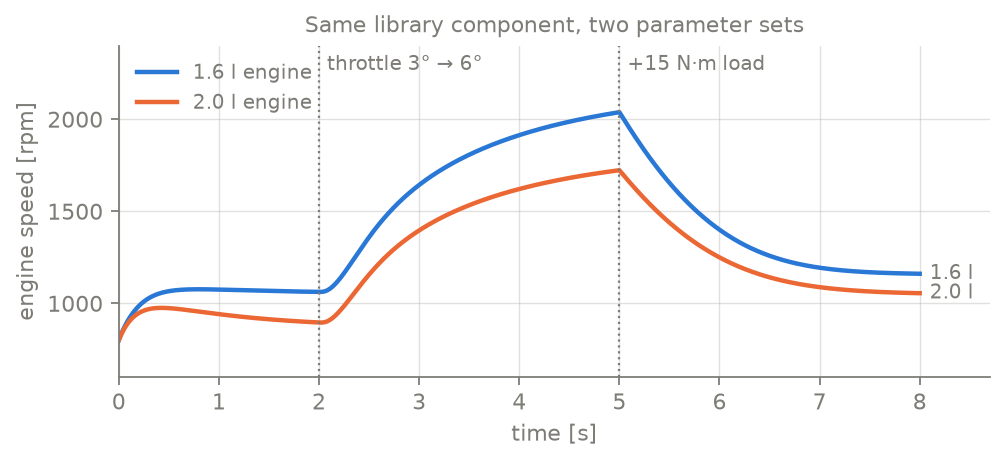
| 3° throttle | 6° throttle | 6° with 15 N·m load | |
|---|---|---|---|
| 1.6 l | 1063 rpm | 2029 rpm | 1161 rpm |
| 2.0 l | 899 rpm | 1716 rpm | 1055 rpm |
At the same small throttle opening the larger engine runs slower: the throttle limits the air, and the larger
engine has more friction to overcome. Set displacement = 0.003 on engine_2_0l and run again: 621 rpm at 3°.
Give it a larger throttle body (throttle_area = 0.0042) instead: 1044 rpm. Each instance keeps its own values.
Step 3: change the component for everyone
Right-click the library in the Library panel ▸ Open Library for Editing (or File ▸ Open
examples/library/engine_parts.nervlib). Change something inside mean_value_engine, for example the friction
in its net_torque block, and save. Back in engine_comparison.nervus, File ▸ Update Library Links: both
engines now use the new friction, and keep their own mask values.
You cannot change the inside of a linked copy directly (that would break the link to the library); Break Link in Properties makes it an ordinary subsystem if you really want a one-off variant.
Step 4: make your own component
- Select a group of blocks in any model and press Ctrl+G: they become a subsystem, with In and Out blocks where the wires crossed the selection.
- Right-click it ▸ Edit Mask… and add the parameters it should have (names, default values, units). Use those names in the blocks inside.
- Edit ▸ Save Subsystem to Library… and pick or type a
.nervlibfile. Your subsystem becomes a linked copy, and the library appears in the Library panel, marked 📚, ready to be dragged into other models.
Models store the library path relative to the model file, so a project folder with models and libraries can be shared in Git as a whole. See Component libraries and Subsystems.
Experiments
| Try | What you will see |
|---|---|
displacement = 0.003 on engine_2_0l |
621 rpm at 3°: the throttle limits a large engine even more |
throttle_area = 0.0042 on engine_2_0l |
1044 rpm at 3° and 1446 rpm under load: the air path decides the speed |
J = 0.1 on engine_2_0l |
the same steady speeds, but faster changes after each step |
Next
Next in this topic: Scripting and testing models from Python. Or pick another one from the tutorial overview.