Tutorial: Live calibration over XCP
| You will learn | how calibration tools work: XCP on CAN, A2L files, measuring and changing values in a running ECU, a command-line calibration tool, real-time simulation |
| Before this | Your first model: a cruise control |
| Level and time | intermediate, about 35 minutes |
| Follow along | start the editor (uv run nervus), File ▸ Open examples/xcp_calibration.nervus, press ▶ and double-click the scopes; the figures below come from the same model |
| Topic | ECU software, communication and diagnostics ▸ Vehicle networks (all tutorials) |
Calibration engineers tune an ECU while the car drives: a tool such as INCA or CANape reads signals and changes parameters in the ECU's memory over XCP, using the ECU's A2L file to know where each variable is. In this tutorial the "ECU" is a running model: the cruise control of the first tutorial with an XCP Slave block, on a virtual CAN bus, and the tool is a small command-line program in another terminal.
uv run python examples/xcp_calibration.py # a scripted session: model and tool in one program, at 8× real time
The ECU side
Open examples/xcp_calibration.nervus. Compared with the cruise control there are three new blocks:
- xcp (XCP Slave): its inputs are measurements the tool can read (
speed,force, andtime, the ECU's clock); its outputs are calibration values the tool can change:set_speed_cal(100 km/h) andgain_trim(1.0), which start at their workspace values. - The set speed now comes from
set_speed_cal, andgain_trimmultiplies the speed error before the PI controller, which scales both its P and I terms. - can (CAN Bus): interface
udp_multicast, python-can's virtual CAN bus shared by all programs on this computer. With a real CAN adapter you would choosepcan,kvaser,vectororsocketcan.
The model's Simulation Settings have pacing 1: it runs in real time, like an ECU, so a person or a tool can follow it. The XCP Slave answers on CAN identifier 0x7F1 to requests on 0x7F0.
The A2L file tells the tool where the values are; examples/xcp_calibration.py writes
examples/xcp_calibration.a2l:
/begin CHARACTERISTIC set_speed_cal "Set speed (calibrated over XCP)"
  VALUE 0x10000 RL_FLOAT64 0 CM_IDENTICAL 0.0 180.0
  PHYS_UNIT "km/h"
/end CHARACTERISTIC
/begin MEASUREMENT speed ""
  FLOAT64_IEEE CM_IDENTICAL 0 0 -1e12 1e12
  ECU_ADDRESS 0x20000
/end MEASUREMENT
Step 1: run the ECU
Start the editor with the model and press ▶ (the stop time is 60 s; it now takes 60 s):
uv run nervus examples/xcp_calibration.nervus
Step 2: measure and calibrate from another terminal
While it runs, use the tool in a second terminal:
uv run python examples/xcp_tool.py watch speed time       # measure twice a second (Ctrl+C to stop)
uv run python examples/xcp_tool.py write set_speed_cal 60  # calibrate: a new set speed
The tool connects (XCP CONNECT), reads each value by address (SHORT_UPLOAD / UPLOAD) and writes calibration
values (DOWNLOAD). After the write the car slows to 60 km/h: the next watch shows the speed falling, and the
scope in the editor shows it too. This is exactly how an engineer works with a real ECU; only the transport
differs. For a real ECU on a PCAN adapter:
uv run python examples/xcp_tool.py --interface pcan --channel PCAN_USBBUS1 --bitrate 500000 --a2l ecu.a2l read engine_rpm
The scripted session
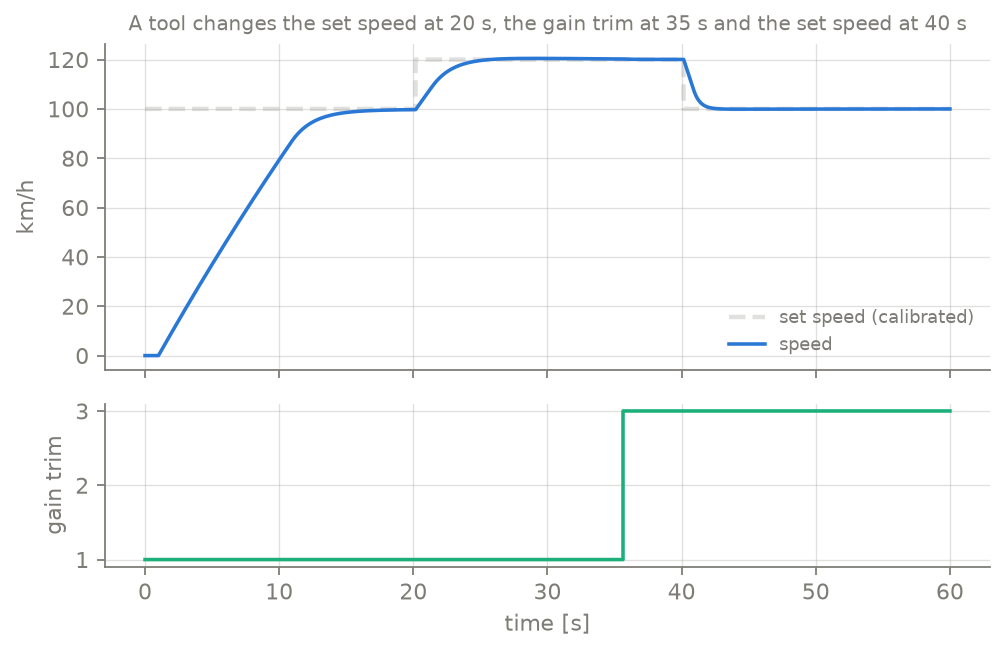
uv run python examples/xcp_calibration.py runs the same thing in one program, 8× faster than real time: a
script plays the calibration engineer, following the ECU's clock. At 20 s it raises the set speed to 120 km/h, at
35 s it triples the controller gain, and at 40 s it lowers the set speed to 100 km/h again. With three times the
gain, the car comes down faster (it brakes harder), as the calibrator wanted:
Experiments
| Try | What you will see |
|---|---|
xcp_tool.py write gain_trim 0.3 while running |
a sluggish controller: the next set speed change takes much longer |
xcp_tool.py write set_speed_cal 200 |
a full calibration tool would refuse this (the A2L limit is 180 km/h); this small tool does not check, and the car accelerates at the full 4000 N towards 200 km/h |
xcp_tool.py read speed when the model is not running |
no ECU answers: XCP needs a running slave |
Polled measurement (reading values one by one) is what this tool does; production tools also use DAQ lists, where the ECU sends measurements on its own every task cycle. See CAN communication for the protocol details and how to make your own models measurable.
Next
Next in this topic: On-board diagnostics and trouble codes. Or pick another one from the tutorial overview.