Tutorial: Engine operating modes
| You will learn | an ECU's mode logic as a State Chart: cranking, starter protection, idle, fuel cut-off, stall; calibration parameters in a chart; behaviour specified by test cases |
| Before this | Your first model: a cruise control |
| Level and time | beginner, about 30 minutes |
| Follow along | start the editor (uv run nervus), File ▸ Open examples/engine_modes.nervus, press ▶ and double-click the scopes; the figures below come from the same model |
| Topic | Powertrain and engine control ▸ Engine management (all tutorials) |
examples/engine_modes.py models the mode logic at the heart of every engine ECU: is the engine off,
cranking, idling, running, coasting with the fuel cut off, or stalled? It is a State Chart running every
10 ms, and its behaviour is specified by test cases that drive the key, engine speed and pedal.
uv run python examples/engine_modes.py
The modes
| Mode | When | What the ECU does |
|---|---|---|
| off | key off | no fuel, no ignition |
| crank | key on, engine below 600 rpm | starter on, fuel on (cranking enrichment) |
| crank_fail | cranking for more than 3 s | starter off to protect it, until the key is turned off |
| idle | engine runs, pedal released | the idle speed controller holds the speed |
| run | pedal pressed | torque follows the driver |
| fuel_cut | coasting above 1500 rpm with the pedal released | injectors off: no fuel is needed to coast |
| stalled | the engine stopped while the key is on | no fuel and no automatic restart |
The thresholds are param names in the chart, so they are calibration parameters in the Model Workspace:
rpm_started (600 rpm), crank_limit (300 samples of 10 ms = 3 s), rpm_cut_on (1500 rpm), rpm_cut_off
(1100 rpm) and so on.
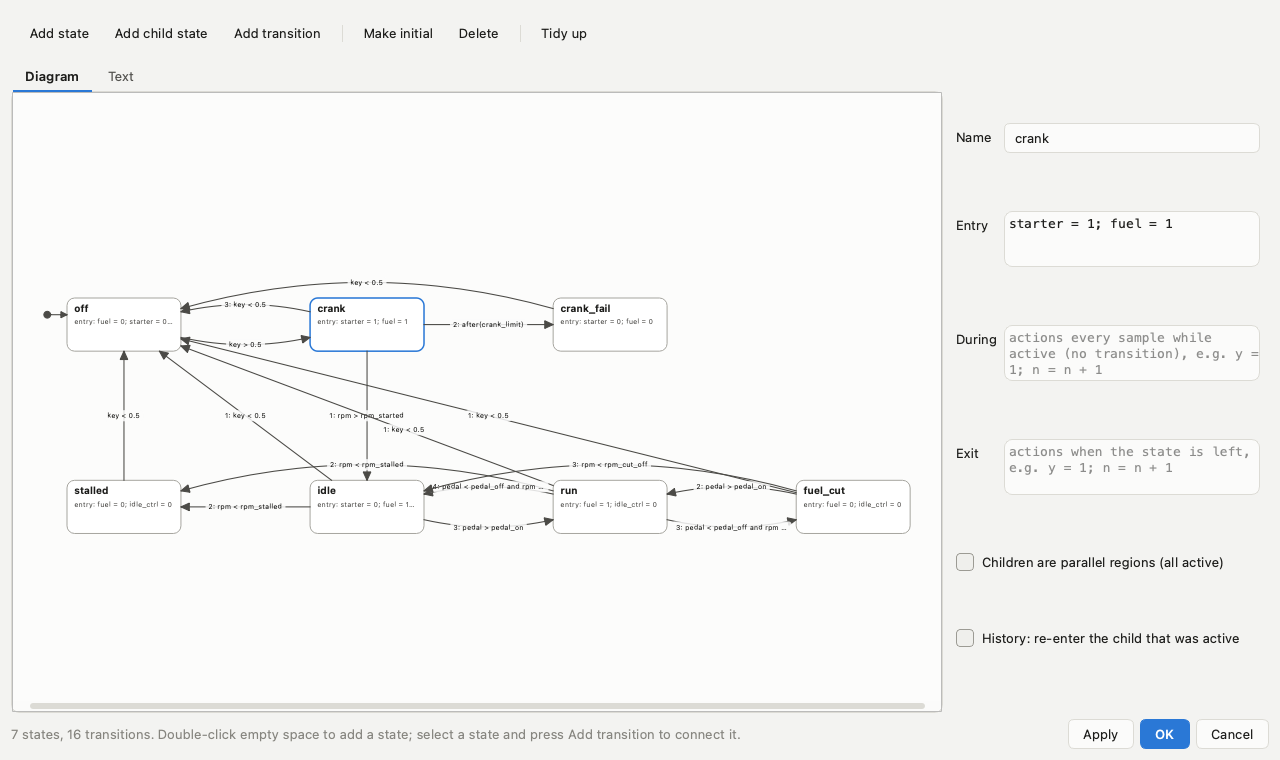
Double-click the modes block: the chart editor shows the modes as states and the conditions as arrows. Click
the arrow from crank to idle to see its guard, rpm > rpm_started; the number in front of it, 1, means it is
checked first of the three transitions leaving crank. See the chart editor.
Follow the scenarios
The model has no sources of its own: its inputs come from the four test cases. Open the Test Manager tab and press Run All (Ctrl+T); all four pass. Double-click a result to see its signals in the Data Inspector.
- normal start: key on at 0.5 s; the engine cranks at 250 rpm and catches at 1.8 s (crank → idle).
- failed start protects the starter: the engine never starts; after exactly 3 s of cranking the chart goes to crank_fail and switches the starter off.
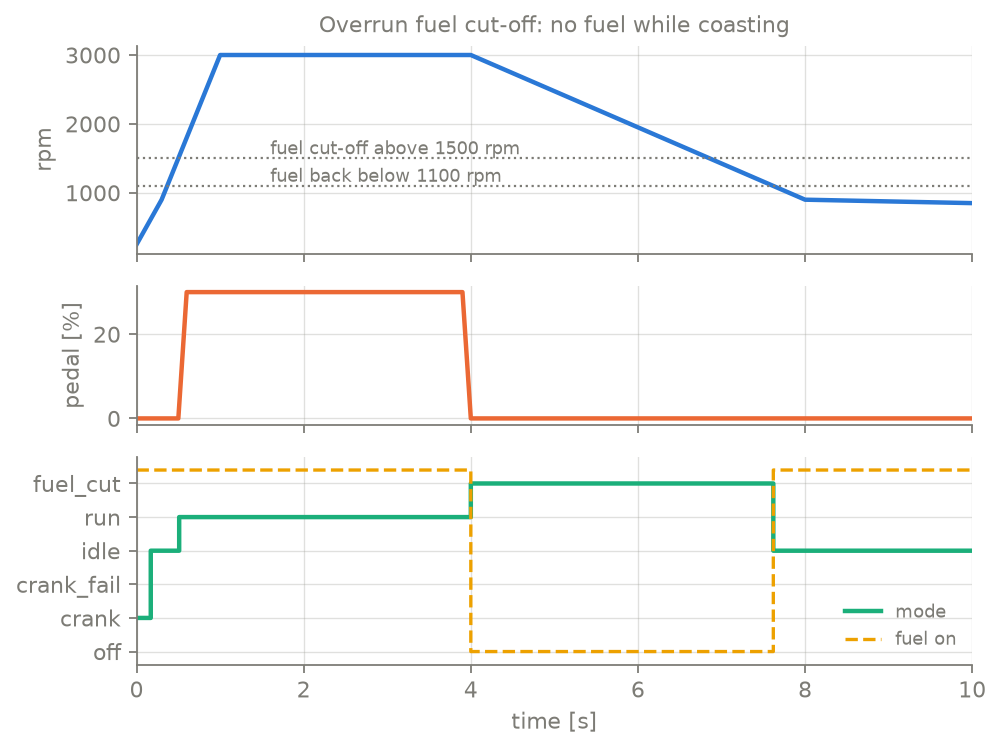
- overrun fuel cut-off: the driver lifts the pedal at 4 s with the engine at 3000 rpm. The chart cuts the fuel (fuel_cut) and gives it back at 7.6 s, when the speed falls below 1100 rpm, early enough that the engine does not stall:
- stall: the speed drops below 300 rpm at 2.4 s: stalled, no fuel, and the chart stays there until the key is turned off.
The order of the transitions matters: in run, run -> fuel_cut is written before run -> idle, so coasting
at high speed cuts the fuel instead of going to idle. The Model Advisor (Analysis ▸ Model Advisor) checks charts
for states that can never be reached and for transitions that can never fire.
Experiments
Change a value in the Model Workspace and press Run All in the Test Manager:
| Try | What you will see |
|---|---|
crank_limit = 100 (1 s) |
two tests fail: normal start (this engine needs 1.3 s of cranking, the chart gives up at 1.5 s) and failed start (it specifies 3 s of cranking): the tests are the specification |
rpm_cut_off = 800 |
overrun fuel cut-off fails: the speed never falls below 800 rpm in the scenario, so the fuel never comes back (in a car the engine would stall) |
rpm_cut_on = 3500 |
no fuel cut-off at all: the chart stays in run until 7.4 s and then goes to idle; the fuel is never switched off |
in the chart editor, select crank → off (key < 0.5) and press Check earlier twice |
no change in these scenarios: the key stays on while cranking. The order matters only when two guards are true at the same time |
The chart can be generated as C code (Code ▸ Generate C Code), and a back-to-back test checks the code against the simulation; see C code generation.
Next
Next in this topic: Radiator fan control. Or pick another one from the tutorial overview.